Standing Gaming Desk Guide: Is an Adjustable Gaming Desk Worth It?

Is a standing gaming desk worth it? See what width, depth, weight capacity and height range you need for dual monitors and a gaming PC, plus setup steps.
Table of Contents
Quick Answer
A standing gaming desk is worth it if you spend long hours at the same desk, use it for both gaming and work, or want to change positions during the day. Choose one that is wide enough for your monitors, deep enough to keep your screens 20 to 40 inches from your eyes, rated for the total weight of your gear, and has a height range that fits both your sitting and standing posture.
Key Points
· A standing gaming desk, also called an adjustable gaming desk, moves between sitting and standing height at the push of a button.
· It helps most when you game and work at the same desk, or when long sessions keep you in one position for hours.
· For a dual monitor standing desk setup, check the width first; for comfortable viewing, check the depth.
· Add up the weight of everything on the desk and compare it with the desk's evenly distributed load rating.
· Plan cable slack and PC placement before you raise the desk for the first time.

What Is a Standing Gaming Desk?
A standing gaming desk, also sold as a gaming standing desk or a height adjustable gaming desk, is a desk built to hold a full gaming setup that you can raise and lower, so you can play sitting down or raise the desk and play standing up.
Most standing gaming desks use electric motors in the legs and a control panel with memory presets, so you can return to the same height every time. What makes one a gaming desk rather than a plain office desk is usually the setup around it: room for two monitors or an ultrawide screen, a place for your PC, and built-in ways to manage cables and store gear.
A fixed-height gaming desk can do many of the same things. The difference is that a fixed desk stays at one height, while an adjustable gaming desk lets you change the height whenever your posture, chair or task changes.
Is a Standing Gaming Desk Worth It?
A standing gaming desk is worth it if you sit at your desk for long sessions, use the same desk for gaming and work, or share it with someone of a different height.
The main benefit is not standing all day. It is being able to change position. The U.S. Occupational Safety and Health Administration (OSHA) notes that regardless of how good your working posture is, working in the same posture or sitting still for prolonged periods is not healthy, and suggests performing some of your tasks while standing.
When you use a standing desk for gaming, that might mean sitting for a long competitive match, then standing to browse, stream, chat or play a slower game. If you also work from the same desk, you can save one height for gaming and another for work.
When a standing gaming desk makes the most sense
· You game or work at the desk for several hours a day.
· One desk has to handle both gaming and work.
· More than one person uses the desk.
· You want to fine-tune the height for a new chair, keyboard or monitor arm.
When a fixed-height desk may be enough
If you play in short sessions, rarely change your setup and already have a desk and chair that fit you, a fixed-height gaming desk can be enough, and you may not need a sit stand gaming desk. You can still take regular breaks to stand up and move.
For a closer look at the benefits, see our guide: Benefits of a Standing Desk
Not sure how long to stand each day? See: How Long Should You Stand at a Standing Desk?

How Wide Should a Dual Monitor Standing Desk Be?
Measure your monitors side by side and add room for your speakers, lights or controller stand; that total is the minimum desk width you need.
Width matters more than anything else in a dual monitor gaming setup. Two monitors placed next to each other take up their combined width, and you will want a little extra space on each side for the rest of your gear.
OSHA recommends putting the monitor directly in front of you and says monitors should not be farther than 35 degrees to the left or right. In practice, that means centering your main gaming screen and placing the second screen beside it, angled toward you, rather than spreading both screens far apart.
If you use one ultrawide monitor instead, measure its width and check that the desk is wide enough to center it in front of your keyboard.
For standard desk widths and depths, see: How to Choose Ideal Desk Dimensions

How Deep Should a Gaming Desk Be?
A gaming desk should be deep enough to keep your monitor 20 to 40 inches from your eyes while leaving room for your keyboard and mouse in front of it.
OSHA describes the preferred viewing distance as between 20 and 40 inches (50 and 100 cm) from the eye to the front of the screen, and recommends providing adequate desk space between you and the monitor. When the desk is too shallow, the screen ends up too close, which OSHA notes can make your eyes work harder to focus and push you into awkward postures.
Monitor arms help here. Mounting your screens on an arm instead of their stands frees up desk depth and lets you push each monitor back to the distance that suits you.
Large monitors need extra attention. OSHA points out that very large monitors may increase the downward viewing angle, so check that you can see the whole screen comfortably at both sitting and standing height.
If long sessions leave your neck sore, see: How to Fix Tech Neck
How Much Weight Can a Standing Gaming Desk Hold?
A standing gaming desk needs a load rating higher than the combined weight of everything you put on it, including monitors, monitor arms, speakers and, if it sits on or under the desk, your PC.
Look for the desk's rated capacity and check whether it is listed as evenly distributed. Then add up the weight of your gear from each product's spec sheet. Remember that anything mounted under the desk, such as a PC mount or a cable tray, also lifts with the desk.
Will a Standing Gaming Desk Wobble at Standing Height?
How steady a standing gaming desk feels depends on its frame, the load and the floor, so check all three before you buy.
· Frame and motors: check how many motors the desk uses and where they sit.
· Number of stages: the number of stages affects the height range, so compare the range with your sitting and standing heights.
· Load: keep the total weight within the rated capacity and spread heavy items across the desk rather than stacking them at one end.
· Floor and feet: set the desk on a level floor, and avoid adding wheels unless the manufacturer supports them.
For the trade-offs between frame types, see: 2-Stage vs 3-Stage Standing Desk
What Height Range Does a Standing Gaming Desk Need?
A standing gaming desk should lower far enough for your sitting posture and rise high enough for your standing posture, so that in both positions your elbows can stay close to your body and bend between 90 and 120 degrees, as OSHA recommends.
OSHA describes a neutral posture in which your hands, wrists and forearms are straight and roughly parallel to the floor, your shoulders are relaxed and your elbows stay close to your body. Set your keyboard height so you can hold that posture whether you are sitting or standing.
Then check your monitors. OSHA recommends that the top of the monitor be at or slightly below eye level. Because your eye level changes when you stand up, a monitor arm makes it easier to readjust the screen after you raise the desk.
Memory presets save time. Once you find your sitting and standing heights, save them so you can switch with one button.
For height guidance based on your own height, see: The Proper Height for a Standing Desk

How Do You Manage Cables on a Standing Gaming Desk?
Attach everything on the desk to the desk itself, and leave enough slack in any cable that connects to something on the floor, such as a wall outlet.
On a standing desk, cables move every time the desk goes up or down. A power strip mounted under the desk moves with it, so only one cable has to run to the wall. Give that cable, and any other cable that reaches the floor, enough length to reach the desk at its highest setting.
An under-desk cable tray keeps the power strip, adapters and spare cable length out of sight.
For more ideas, see: Cable Management Tips and How to Hide Cords on a Desk

Where Should Your Gaming PC Go on a Standing Desk?
Your gaming PC can stay on the floor or be mounted under the desk; if it is mounted, it moves with the desk, so check its clearance at the lowest height.
A PC on the floor needs cables long enough to reach the desk at its highest setting. A PC mounted under the desk keeps its cables short and frees up floor space, but it changes height with the desk, so make sure the mount never touches the floor or other accessories when you lower the desk.
For a step-by-step look at mounting a PC under a desk, see: Under Desk PC Mount Installation Guide

How to Set Up a Standing Gaming Desk Step by Step
Follow these six steps the first time you put together your standing desk gaming setup.
1. Assemble the desk and place it on a level floor, with space behind it for cables.
2. Mount the power strip under the desk and route all cables into the tray.
3. Set your sitting height first: adjust the desk until your elbows bend between 90 and 120 degrees, then save it as a preset.
4. Place your main monitor directly in front of you, 20 to 40 inches away, with the top of the screen at or slightly below eye level.
5. Raise the desk to standing height, find the same elbow position, check your monitor height again and save it.
6. Run the desk from its lowest to its highest setting once to confirm that no cable is pulled tight and nothing under the desk hits the floor.
Standing Gaming Desk Checklist
What to check | Why it matters | What to look for |
Width | Fits your monitors and gear | Monitors side by side plus room for speakers and accessories |
Depth | Keeps the screen at a comfortable distance | Room for a 20–40 in viewing distance plus keyboard and mouse |
Load rating | Keeps the desk steady and working smoothly | Higher than the total weight of everything on and under the desk |
Height range | Fits both sitting and standing | Elbows at 90–120° in both positions |
Memory presets | Makes switching quick | At least one sitting and one standing height |
Cable management | Stops cables from pulling as the desk moves | Under-desk tray and enough slack to the floor |
PC placement | Protects the PC and cables | Clearance at the lowest height if the PC is mounted |
For more on choosing a standing desk in general, see: How to Pick the Best Standing Desk for Your Workspace
To finish the look, see our guides to Gaming Desk Accessories and Gaming Room Setup
Frequently Asked Questions
Are adjustable desks good for gaming?
Yes, if you want to change positions during long sessions or share one desk between gaming and work. An adjustable gaming desk lets you sit for some games and stand for others without changing your setup.
Are adjustable desks worth it?
They are worth it when you use the desk for several hours a day or for more than one task. OSHA notes that working in the same posture for prolonged periods is not healthy, and an adjustable desk makes it easy to change position.
What is the best desk for a gaming setup?
The best desk for a gaming setup is wide enough for your monitors, deep enough to keep them 20 to 40 inches from your eyes, rated for the weight of your gear and adjustable to both your sitting and standing heights.
How wide should a desk be for two monitors?
Measure both monitors side by side and add space for your other gear.
Can a standing desk hold a gaming PC?
Yes, as long as the total weight of the PC, monitors and accessories stays within the desk's load rating. If you mount the PC under the desk, check that it does not touch the floor when the desk is lowered.
How do I stop my standing gaming desk from wobbling?
Keep the desk on a level floor, stay within the rated load, spread heavy items across the desktop and avoid adding wheels unless the manufacturer supports them.
Which Standing Gaming Desk Should You Choose?
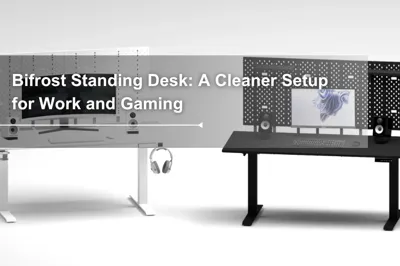
If you want one desk that covers the checklist above, the Bifrost series is built for it: two desktop widths for single or dual monitors, a 264.6 lb (120 kg) load rating, a cable tray under the desktop and an optional D-Board pegboard for gaming gear. Choose Bifrost Elite for the wider height range, or Bifrost Pro for a 2-stage frame.
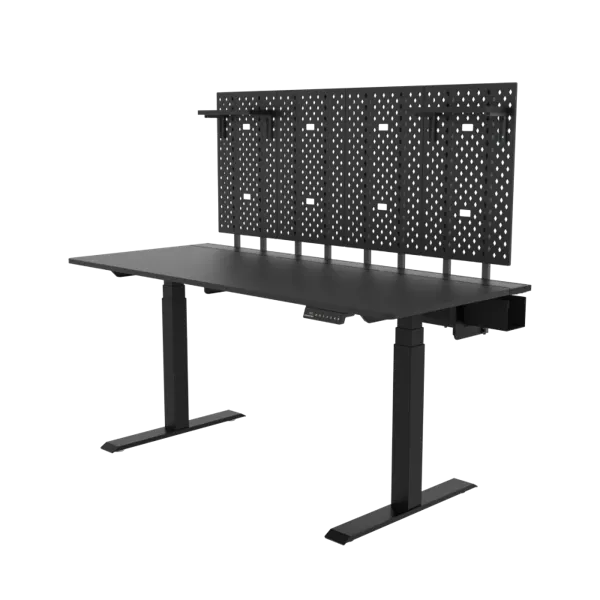
Bifrost Elite: The Wider Height Range for Sitting and Standing
· 3-stage frame with dual motors, one in each column, adjusting from 25.6 to 51.2 inches (65–130 cm).
· Desktop sizes of 47.2 x 27.6 in and 63 x 27.6 in, including the cable tray frame. The 63-inch desktop has enough space for two 27-inch monitors.
· Rated for 264.6 lbs (120 kg) evenly distributed.
· 4 memory heights, a digital height display and built-in anti-collision detection.
· Runs at 50 dB or less while operating.
· Includes a 19-liter cable tray; monitor arms install by lifting the magnetic cover.
· Meets ANSI/BIFMA office furniture standards and California CARB-P2 formaldehyde emission standards.
· 10-year warranty on the lifting legs and free shipping to the contiguous United States.
Bifrost Pro: A 2-Stage Standing Gaming Desk
· 2-stage frame with dual motors, one in each column, adjusting from 27.6 to 47.2 inches (70–120 cm).
· Designed with dual 27-inch monitors or an ultrawide monitor in mind.
· The same desktop sizes, 264.6 lb (120 kg) load rating, 4 memory heights, cable tray and D-Board option as the Bifrost Elite.
· 10-year warranty on the lifting legs and free shipping to the contiguous United States.
Bifrost Elite vs Bifrost Pro
Bifrost Elite | Bifrost Pro | |
Frame | 3-stage, dual motors | 2-stage, dual motors |
Height range | 25.6–51.2 in (65–130 cm) | 27.6–47.2 in (70–120 cm) |
Lifting speed (no load) | 45±3 mm/s | 38±4 mm/s |
Load rating | 264.6 lbs (120 kg) | 264.6 lbs (120 kg) |
Memory heights | 4 | 4 |
Desktop sizes | 47.2 x 27.6 in / 63 x 27.6 in | 47.2 x 27.6 in / 63 x 27.6 in |
D-Board Pegboard: Vertical Storage for Gaming Gear
· Optional D-Board back panel: 3 panels on the 47.2-inch desk and 4 panels on the 63-inch desk.
· Each panel holds up to 22 lbs (10 kg), and D-Board configurations come with 2 shelves that hold up to 3.3 lbs (1.5 kg) each.
D-Board Monitor Mount: For Dual Monitor Gaming Setups
· Installs without drilling or wall studs and is designed for one or multiple monitors.
· Size M fits monitors up to 32 inches within 15.4 lbs (7 kg).
· Size L fits flat monitors up to 43 inches (33.1 lbs / 15 kg) and curved monitors up to 49 inches, including 32:9 ultrawides (30.9 lbs / 14 kg).
· Supports VESA 75 x 75 and 100 x 100 mm, with 20° swivel and 90° pivot.
View the D-Board Monitor Mount
Under Desk PC Mount: Keep Your Gaming PC Off the Floor
· Holds up to 44.1 lbs (20 kg) and fits Mid-Tower, Micro-ATX and Mini-ITX cases.
· Fits cases 7.2–9.8 in wide, 12.4–19.3 in high and 7.1–23.6 in deep, and slides front to back along a fixed track.
· On Bifrost desks it installs with the included adapter bracket, which requires drilling; the tabletop must be at least 18 mm thick, and Bifrost desktops are 20 mm thick.[CL1]
· Make sure the mount does not touch the floor or other accessories when you lower the desk.
Tag


Dezctop