Bifrost Standing Desk: A Cleaner Setup for Work and Gaming

Build a cleaner work and gaming setup with Bifrost. Compare Bifrost, Pro, and Elite models, and see how D-Board and cable management complete your desk.
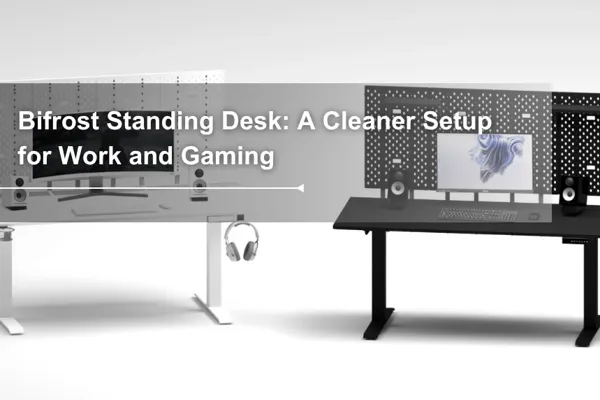
Table of Contents
A standing desk should do more than move up and down. For a modern workstation, the desk also needs to hold multiple screens, organize cables, support daily accessories, and adapt to both work and gaming setups.
The Bifrost Series is Dezctop’s modular desk system built around that idea. With fixed and electric height-adjustable models, integrated cable management, D-Board compatibility, and options in 120 cm and 160 cm sizes, Bifrost is designed for users who want a cleaner, more organized desktop from day one.
More Than a Standing Desk: The Bifrost Workspace System

The Bifrost Series is Dezctop’s all-in-one standing desk system, designed to bring height adjustment, cable management, and vertical storage into one organized workspace. What is Dezctop’s special standing desk? Unlike a regular standing desk that only focuses on sit-stand movement, Bifrost helps you manage your entire setup, from monitors and cables to accessories and everyday desk essentials.
Its electric height adjustment supports smooth transitions between sitting and standing, while the built-in cable management tray helps reduce cable clutter under the desk. With D-Board compatibility, you can expand your workspace vertically and customize your setup for work, gaming, studying, or multitasking.
Who Is Bifrost Best For?
Bifrost is designed for gamers, creators, and multitaskers who need more than a basic standing desk. It is especially suitable for dual-monitor setups, ultrawide monitors, streaming gear, gaming devices, and creator equipment that require a cleaner and more structured workspace.
With a spacious desktop, Bifrost can comfortably support dual 27-inch monitors without making the setup feel crowded. The 160 cm / 63" desktop option gives larger setups more room for monitors, speakers, desk accessories, and everyday essentials.
Whether you are a competitive gamer, casual player, or content creator, the Bifrost Series works with D-Board and compatible accessories to help you build a personalized gaming and performance setup. Instead of placing everything on the desktop, you can expand vertically and keep your main work area cleaner, more focused, and easier to manage.
Bifrost vs Bifrost Pro vs Bifrost Elite
At first glance, the Bifrost model names may seem a little confusing. But once you understand the basic structure, it becomes much easier to choose the right Bifrost desk for your setup.
Simply put, Bifrost Elite and Bifrost Pro are height-adjustable standing desks, while Bifrost is a fixed-height gaming desk.
Bifrost Elite
The Bifrost Elite standing desk is ideal for users who need a wider height adjustment range, especially if the desk will be used by people with different heights.
Bifrost Pro
The Bifrost Pro standing desk is a practical choice for users whose sitting and standing positions fall within a standard height range. If you do not need an extra-low or extra-high desk position, Bifrost Pro offers smooth electric height adjustment at a more budget-friendly price.
It features 2-stage legs, dual motors, and a height adjustment range of 27.6–47.2 inches.
Bifrost
Bifrost is designed for users who want a stable, premium-looking gaming desk with D-Board compatibility and built-in cable management, but do not need electric height adjustment.
It uses a box-frame leg structure, which provides stronger stability than a typical T-shaped leg design. While the Bifrost Elite and Bifrost Pro standing desks support up to 264.6 lbs (120 kg), the fixed-height Bifrost 120 / 160 supports up to 330.7 lbs (150 kg).
Bifrost Cable Management: How the Built-In Tray Works

Every desk in the Bifrost Series comes with built-in cable management, so you do not need to purchase an extra cable tray separately. The tray is integrated into the desk structure and uses a suspended fabric design to create generous storage space under the desktop. The 160 cm version offers about 19L of cable storage, while the 120 cm version offers about 12.5L, giving you enough room for power strips, adapters, and essential cables.
One of the biggest advantages of the Bifrost cable tray is how easy it is to use. Place your cables, power strip, and adapters inside the tray, close the cover, and your setup instantly looks cleaner. The magnetic cover also makes access simple while keeping the overall structure firm and secure, just like its solid exterior suggests.
D-Board: Turning the Back of Your Desk Into Vertical Storage

D-Board is another key feature of the Bifrost Series. It turns the back of the desk into a vertical organization area, allowing users to arrange their setup based on their work or gaming needs. With compatible D-Board accessories, you can organize monitors, gaming controllers, keyboards, decorative items, everyday tools, and more in a way that fits your personal PC space.
Beyond storage and display, D-Board helps free up valuable desktop space and keeps your setup cleaner, more organized, and easier to use every day.
Bifrost Model Comparison
Model | Bifrost | Bifrost Pro | Bifrost Elite |
|---|---|---|---|
Tabletop w/ Cable Tray Frame | 47.2 x 27.6 x 0.7 in 63 x 27.6 x 0.7 in | 47.2 x 27.6 x 0.7 in 63 x 27.6 x 0.7 in | 47.2 x 27.6 x 0.7 in 63 x 27.6 x 0.7 in |
Tabletop w/o Cable Tray Frame | 47.2 x 22.8 x 0.7 in 63 x 22.8 x 0.7 in | 47.2 x 22.8 x 0.7 in 63 x 22.8 x 0.7 in | 47.2 x 22.8 x 0.7 in 63 x 22.8 x 0.7 in |
Height | 28 in (71 cm, fixed) | 27.6~47.2 in. (70~120 cm) | 25.6~51.2 in. (65~130 cm) |
Frame Type | Fixed steel legs with an integrated, one-piece design | Two-stage lifting equipped with dual motor | Three-stage lifting equipped with dual motor |
Space Between Legs | 30.7 in (78 cm)/ 44.9 in (114 cm) | 29.1 in. (74 cm)/ 43.3 in. (110 cm) | 29.1 in. (74 cm)/ 43.3 in. (110 cm) |
Color | Black / White / Walnut / Oak / Ash Black | Black / White / Walnut / Oak / Ash Black | Black / White / Walnut / Oak / Ash Black |
Cable Tray Size | 46.1 x 3.5 x 5.1 in/ 62 x 3.5 x 5.1 in | 46.1 x 3.5 x 5.1 in/ 62 x 3.5 x 5.1 in | 46.1 x 3.5 x 5.1 in/ 62 x 3.5 x 5.1 in |
Max Load | 330.7 lbs (150 kg) evenly distributed | 264.6 lbs (120 kg) evenly distributed | 264.6 lbs (120 kg) evenly distributed |
Build Your Bifrost Setup for Work, Gaming, or Multitasking
Creator Workstation

Creative work often comes with more tools than a standard desk can comfortably handle. From editing devices and audio gear to notebooks, controllers, and reference materials, every item needs a clear place without taking over the entire desktop.
Gaming Setup

A gaming desk has to handle more than a keyboard and mouse. Monitors, speakers, headsets, controllers, RGB devices, microphone, and desktop PC accessories can quickly turn the setup into a mess if there is no clear system behind it.
Bifrost is built for this kind of gear-heavy environment. The spacious desktop gives your gaming equipment room to breathe, while the integrated cable management system helps reduce visible clutter around the station. With D-Board and compatible accessories, the back of the desk becomes a place to store, display, and personalize your setup, helping you build a cleaner gaming space with more presence.
Multi-Monitor Command Center

Bifrost is a strong foundation for users who work, play, or manage multiple screens throughout the day. With its spacious desktop, you have enough room for dual 27-inch monitors and a laptop, giving your setup the space it needs without feeling overcrowded. If you prefer a more flexible screen layout, Bifrost also supports compatible monitor arms, so you can adjust your display position based on the way you work or play.
The built-in cable management tray under the desktop helps keep monitor cables, power cords, and device connections hidden and organized. With fewer visible cables around your setup, your workspace feels cleaner, more structured, and easier to focus on.
Ready to Build Your Bifrost Setup
Create a desk setup that feels cleaner, sharper, and more personal. Explore the Bifrost Series and choose the model that fits the way you work, play, and create.
FAQ
Is Bifrost good for a gaming setup?
Yes. Bifrost is well suited for gaming setups that use dual monitors, an ultrawide monitor, speakers, controllers, headphones, and other accessories. Its spacious desktop, built-in cable management, and D-Board compatibility help keep gaming gear more organized.
Can Bifrost support dual 27-inch monitors?
Yes. Bifrost can support dual 27-inch monitors, especially with the wider 160 cm / 63" desktop option.
Can I use a monitor arm with Bifrost?
Yes. Bifrost is designed to remain clamp-friendly, so you can use compatible clamp-based monitor arms even with the D-Board structure. The desktop thickness is 20 mm.
What is the D-Board used for?
D-Board helps expand your setup vertically. You can use compatible accessories to store headphones, controllers, small devices, display items, and daily essentials behind the main work area.
Does Bifrost have built-in cable management?
Yes. Bifrost includes built-in cable management to help organize cords, adapters, and power strips under the desk, reducing visible clutter around your setup.
What is the difference between Bifrost Pro and Bifrost Elite?
Bifrost Pro is a practical choice for standard sit-stand needs, while Bifrost Elite offers a wider height adjustment range for users who need more flexibility in sitting and standing positions.
Can the control panel be installed on either side?
Yes. The control panel can be mounted on either side of the desk, giving you more flexibility based on your setup.
Does the Bifrost standing desk controller have height memory presets?
Yes. Bifrost Pro and Bifrost Elite standing desks feature 4 height memory presets, giving you enough saved positions for two users’ sitting and standing heights. This makes it convenient for two people to share the same Bifrost standing desk and switch between their preferred positions with ease.
Does the LED display stay on all the time?
No. The LED display enters standby mode when not in use, helping reduce unnecessary power use during daily operation.
Tag




Dezctop