Standing Desk Accessories Worth Buying: A Practical Checklist

A practical checklist of standing desk accessories in buying order: cable management and a PC mount first, then desk-edge add-ons, then pegboards, desk mats and lights.
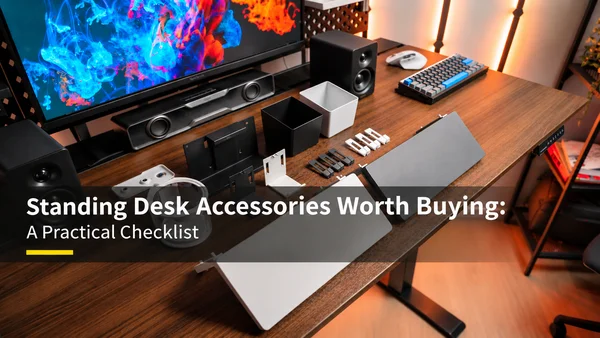
Table of Contents
Standing Desk Accessories Worth Buying: A Practical Checklist
Quick Answer
The standing desk accessories worth buying first are the ones that keep your cables and computer moving with the desk: an under-desk cable tray, a few cable holders and an under-desk PC mount. After that, add accessories that fix a daily annoyance, such as a hub at the desk edge, a headset holder, a cup holder or under-desk hooks. Leave decorative upgrades like light strips for last.
Key Points
· Accessories attached to the desk move with it; anything on the floor stays behind.
· Every cable from the desk to the wall needs enough slack for the highest setting.
· Solve cables and the computer first, then add storage and small upgrades as you need them.

What to Check Before You Buy Standing Desk Accessories
Before you buy any accessories for a standing desk, check three things: whether it attaches to the desk, whether your cables are long enough, and whether the added weight stays within your desk’s limit.
1. Does It Attach to the Desk?
Accessories that clamp, screw or lock onto the desk move up and down with the desktop, while anything standing on the floor stays where it is. For clamp-on accessories, check the tabletop thickness range they support and make sure your desk falls within it.
2. Will Your Cables Reach the Highest Setting?
Every cable that runs from the desk to a wall outlet needs enough slack for the desk’s highest setting. Raise the desk to your usual standing height before you route cables, so nothing pulls out of the wall when the desk goes up.
Not sure what your standing height should be? See: The Proper Height for a Standing Desk
3. Will the Total Weight Stay Within the Desk’s Load Capacity?
Standing desks list a maximum load on their spec sheets, usually for weight that is evenly distributed. Add up your monitors, computer, speakers and accessories to make sure you stay under it, and keep heavier items close to the legs.
Must-Haves: Buy These First
These three accessories solve the most common standing desk problems: messy cables and a computer on the floor that cannot follow the desk.
1. An Under-Desk Cable Tray
An under-desk cable tray holds the power strip and the spare length of every cable, so only one power cord has to run from the desk to the wall. Because the power strip rides with the desk, plugs are not pulled when the height changes.
For a full cable setup, see: Cord Organizer for Desk Setups and Cable Management Tips

2. Cable Holders or Cable Ties
Charging cables tend to slip behind the desk the moment you unplug them. A few cable holders on the desk edge keep the ends in place, and cable ties bundle the spare length so nothing snags when the desk moves.

3. An Under-Desk PC Mount
A computer tower on the floor pulls on its cables every time the desk rises. An under-desk PC mount lifts the tower off the floor so it moves with the desk, and it makes the floor easier to clean. Before you buy, check that your case size and tabletop thickness match the mount’s specs.
For installation steps, see: PC Mount Installation Guide

Nice-to-Haves: Add These When You Notice the Need
After a few weeks, you will notice which items never have a place. These four accessories move them to the desk edge or under the desk, so the desktop stays free for work.
4. A Hub at the Desk Edge
If plugging in a flash drive or memory card means reaching behind your computer, a hub clamped to the desk edge brings the ports you use most within reach. A clamp-on hub also moves with the desk.

5. A Headset Holder
Headphones on the desk take up space, and headphones on a monitor tend to fall. A headset holder mounted just under the desk edge keeps them within reach and off the desktop.

6. A Cup Holder
A cup next to the keyboard is one elbow away from a spill. A cup holder mounted on the outside of the desk edge moves drinks out of the work area while keeping them easy to reach.

7. Under-Desk Hooks
Bags on the floor get kicked, and bags on a chair slide off. Under-desk hooks keep bags and headphones off the floor and within reach.

Setup Upgrades: When the Basics Are Done
Once cables and everyday items have a home, these three accessories make the desk more useful and more personal.
8. A Pegboard for Vertical Storage
A pegboard turns the space behind or above the desk into storage. Hooks, shelves and containers hang on it, so the desktop does not have to hold everything.
For pegboard layouts and installation, see: Pegboard Ideas and How to Hang a Pegboard

9. A Large Desk Mat
A desk mat large enough for both the keyboard and mouse makes the work area look tidier and protects the desktop from scratches. A water-resistant surface is easier to clean after a spill.

10. Light Strips
Light strips behind the desk or on a pegboard set the mood you want. Strips with magnets or adhesive backing are easier to install and move.
For gaming-focused ideas, see: Gaming Desk Accessories

Standing Desk Accessories Checklist
Use this checklist of the best standing desk accessories to decide what to buy first.
Accessory | What it solves | Priority |
Under-desk cable tray | Power strip and spare cable length | Buy first |
Cable holders and ties | Cables slipping behind the desk | Buy first |
Under-desk PC mount | Tower on the floor pulling on cables | Buy first |
Hub at the desk edge | Ports hidden behind the computer | Add when needed |
Headset holder | Headphones taking up desk space | Add when needed |
Cup holder | Drinks too close to the keyboard | Add when needed |
Under-desk hooks | Bags on the floor | Add when needed |
Pegboard | Not enough desktop space | Upgrade |
Large desk mat | Scratches and a messy look | Upgrade |
Light strips | Setting the mood | Upgrade |
Frequently Asked Questions
What accessories do I need for a standing desk?
Start with an under-desk cable tray, a few cable holders and a way to get your computer off the floor. Add other accessories when you notice a daily annoyance they would fix.
What are the best desk accessories?
The best desk accessories move things off the desktop while keeping everyday items within reach, such as a cable tray, a hub at the desk edge and under-desk hooks.
How do I make my standing desk look better?
Hide the cables under the desk, keep only daily items on top, choose accessories in one color, and finish with a pegboard or light strips.
Do clamp-on accessories fit every desk?
Only if your tabletop thickness falls within the clamp’s range. Measure your tabletop before you buy and compare it with the range in the accessory’s specs.
Which Dezctop Desks and Accessories Fit This Checklist?
How well accessories work depends a lot on the desk itself. Both Dezctop standing desk series have built-in points for accessories, and Dezctop makes an accessory for every item on the checklist above.
Start With the Desk: Revon and Bifrost
· Revon standing desk (for home offices):

wood-trim angled legs and hidden dual motors give it a timeless look. Revon Elite has three-stage legs with a 25.6–51.2 in range, and Revon Pro has two-stage legs with a 27.6–47.2 in range. Both come in five tabletop sizes from 47.2 x 27.6 in to 70.9 x 31.5 in, with two memory presets and a 120 kg load capacity (evenly distributed). What matters most for this checklist is what is built in: a rail under the tabletop holds the Cable Management Tray, Under Desk Hooks and desk dividers, which you can reposition anytime, and pre-drilled mounting holes fit the cup holder, headset holder and PC mount.
· Bifrost standing desk (for gaming and multi-monitor setups):

Bifrost Elite has three-stage legs with a 25.6–51.2 in range, and Bifrost Pro has two-stage legs with a 27.6–47.2 in range. Both have dual motors, four memory heights and five colors, with a 47.2 x 27.6 in or 63 x 27.6 in tabletop and a 120 kg load capacity (evenly distributed). A built-in fabric cable tray under the desk holds about 19 liters, enough for power strips and adapters, pre-embedded screw holes on both sides fit the headset holder and cup holder, and you can add a D-Board pegboard behind the monitor.
Shop the Bifrost Standing Desk

Must-Haves: Cables and the Computer
· Cable Management Tray: solid steel, fits a 6-outlet power strip and holds up to 4.4 lbs (2 kg). It installs with a simple twist and no tools, and moves along the Revon rail as your setup changes. Comes with a desk divider.
· Magnetic Cable Holders: 3 per package, each 1 x 1 x 0.5 in, for cables up to 7 mm in diameter.
· DivMag Cable Tie: 4 per package, made of silicone, and attaches to the desk divider or any magnetic surface.
· Under Desk PC Mount: holds up to 44.1 lbs (20 kg) and fits cases 7.2–9.8 in wide, 12.4–19.3 in tall and 7.1–23.6 in deep. It slides front to back to clear cable trays, installs on Revon without drilling, and is recommended for tabletops at least 18 mm thick.
· On a Bifrost desk, the fabric cable tray is already built in, so you can skip the separate tray.
View the Cable Management Tray
View the Magnetic Cable Holders
Nice-to-Haves: The Desk Edge and Underneath
· USB Type-C 7-in-1 Hub: clamps onto tabletops 15–50 mm thick and adds two USB-A ports, one USB-C port, four memory card slots and a 3.5 mm headphone/mic jack, with data transfer up to 10 Gbps (actual speed depends on the input source and devices).
· Headset Holder: fits headsets with a headband up to 54 mm wide and weighing up to 500 g (1.1 lbs). It uses the pre-embedded screw holes on Bifrost, and the included screws or double-sided tape on other desks.
· Cup Holder and Cup Holder Plus: both swivel to fold under the tabletop when not in use, and a diatomaceous earth coaster absorbs condensation from cold drinks. The Cup Holder fits containers under 80 mm in diameter weighing up to 800 g; the Cup Holder Plus holds up to 1.5 kg and fits mugs up to 90 mm in diameter.
· Under Desk Hook (for Revon): 2 per package, locks into the Revon rail without tools, and holds up to 11 lbs (5 kg) each or 22 lbs (10 kg) with both used together.
View the USB Type-C 7-in-1 Hub
Upgrades: Storage, Desk Mats and Lighting
· D-Board pegboard: the Bifrost version mounts behind the monitor, holds up to 22 lbs (10 kg) per panel and includes two shelves; the wall mount version works above any desk and holds up to 11 lbs (5 kg) per panel.
· D-Board Monitor Mount: mounts on the D-Board; the M size fits monitors up to 32 inches and 7 kg, and the L size fits up to 49-inch curved screens. Both pivot 90° into portrait mode.
· Water-Resistant Mouse Pad: the larger NQ900 measures 35.4 x 15.7 in and the smaller NQ350 measures 13.8 x 11.8 in. Both have a water-resistant coating, an anti-slip rubber base and stitched edges.
· RGB Lighting Pack: four LED strips with built-in magnets and 80 LEDs in total. They snap onto steel surfaces such as the D-Board and work with the remote or your motherboard’s ARGB header.
View the Water-Resistant Mouse Pad
Get Them Together: Accessory Bundles
If you would rather buy them together, Dezctop offers three bundles:
· Home Office Accessories Bundle: NQ900 mouse pad, Magnetic Cable Holders and the USB Type-C 7-in-1 Hub.
· Gaming Accessories Bundle: NQ900 mouse pad, Headset Holder, Cup Holder and RGB Lighting Pack.
· Basic Accessories Bundle: Headset Holder, Cup Holder, D-Board Container, D-Board Hooks and the D-Board Monitor Mount M.
Where to Start
If you do not have a standing desk yet, choose the desk first: Revon for a home office, or Bifrost for gaming and multi-monitor setups. If you already have one, start with the must-haves on this checklist and add the rest as you need them.
Shop the Bifrost Standing Desk

Tag






Dezctop