A Desk in Front of a Window: When It Works and When It Doesn’t

In this article, we’ll go through the pros and cons of a window-facing desk, along with a few ways to make it work better in your space.
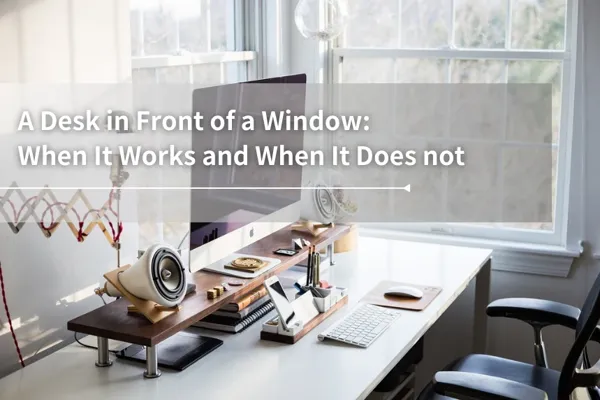
Table of Contents
Putting a desk in front of a window sounds like a great idea at first. The space feels brighter, more open, and a little more pleasant to work in. But as appealing as this setup may seem, it can also come with a few practical downsides. In this article, we’ll go through the pros and cons of a window-facing desk, along with a few ways to make it work better in your space.
Why Some People Like Putting a Desk in Front of a Window
Natural light can make the space feel brighter and more comfortable
Soft natural light often makes a workspace feel warmer, calmer, and more inviting. As long as the sunlight is not hitting the desk too directly, it can also give you a bright working environment without relying as much on artificial lighting.
An outdoor view can make the room feel more open
If the window looks out onto a wider view, the room can feel less confined. Even a simple view of trees, sky, or open space can make the workspace feel more comfortable and easier to spend time in.
It may help reduce eye strain
Research suggests that shifting your gaze into the distance after periods of near work may help relax the eye’s focusing system. A simple example is the 20-20-20 rule, which encourages regular distance-viewing breaks to help reduce digital eye strain.
Morning daylight may help support mood
Morning light can help lift your mood. Exposure to daylight in the early morning helps your body settle into a healthier daily rhythm, making it easier to feel awake and maintain a better mood during the day. It is also thought to play a role in mood regulation, possibly through systems related to emotional balance, including serotonin. This may be why placing a desk near a window feels especially nice in the morning.
Why a Desk in Front of a Window Can Be Problematic
Putting a desk directly in front of a window can also come with a few drawbacks that are easy to overlook.
Glare and screen readability
If sunlight hits your desk at the wrong angle, the glare can get annoying fast. It can make the screen harder to see and the whole setup less comfortable. When the space outside the window is much brighter than the monitor, the contrast on the screen can feel weaker, which may leave your eyes feeling strained and tired more quickly.
Outside movement and noise
A window-facing desk can also make it harder to stay focused, especially if it faces a busy street with constant traffic, movement, or noise. Too much activity outside can pull attention away from work and disrupt concentration.
Heat buildup on monitors and nearby surfaces
Direct sunlight may also heat up the monitor and the surfaces during the hottest parts of the day. Over time, repeated exposure to strong heat and temperature changes may place extra stress on electronic devices.
In some cases, monitors may also make popping or cracking sounds as materials expand and contract with temperature changes. While this kind of noise does not necessarily mean immediate damage, it’s still best to avoid prolonged direct sunlight, especially for large curved monitors, which may be more sensitive to heat buildup and physical stress when placed too close to the window.
Less privacy
Sitting directly in front of a window gives you a clear view outside, but it can also make it easier for people outside to see in. If privacy matters to you, working with your desk facing the window may not be the most comfortable choice.
Why this setup is less than ideal feng shui wise
According to Feng Shui, you want your work area to feel grounded. If your desk is up against a window, noises and movement from outside can interrupt this feeling of stability. It’s easier to get distracted and feel “untethered” from your work.
(Learn More: Feng Shui Guide to Office Desk Placement and Setup)
When a Desk in Front of a Window Can Still Work
If placing a desk in front of a window is unavoidable, try blackout curtains or layered window treatments (e.g: Silhouette Shades) to soften the light and reduce visual distractions from outside. It's also helpful to keep some space between the window and desk so your workstation is less affected by heat and glare.
How to Reduce Glare, Distractions, and Heat
If you plan to place your desk in front of a window, there are a few ways to address the challenges mentioned above.
Use blackout curtains or layered window coverings
Blackout curtains can block strong light more effectively, while softer or layered curtains can help diffuse harsh sunlight without making the room feel too dark.
Keep the workstation slightly off-axis from the window
If your monitor is facing the direct sunlight, try repositioning it so it isn't. A small change in angle can help cut down on glare and make the screen easier to use.
Avoid direct afternoon sun
If you can, change your schedule so that you don't do focused screen work during the brightest part of the afternoon. You might want to switch tasks or take a short break outside at that time.
Desk in Front of a Window vs. Desk Beside a Window
If natural light still matters to you, placing the desk beside a window is usually easier to manage than placing it directly in front of one. You can still get the benefit of a brighter space, but with fewer issues from glare, heat, and outside distractions. In many cases, the most practical setup is to keep the desk perpendicular to the window and not too close to it.
Ideal Desk Placement | Ideal Desk Placement |
 |  |
So, Is Putting a Desk in Front of a Window a Good Layout for Work?
Putting a desk in front of a window is not always a bad idea, but it is often not the most balanced one for focused work. While it can make the space feel brighter and more uplifting, it may also bring glare, distractions, privacy concerns, and extra heat. In real life, very few people have a perfect Feng Shui desk setup. The goal is not perfection, but finding a layout that works well for your space, supports your concentration, and feels right for your daily routine.
If you are still figuring out which desk setup works best for your space, Dezctop’s two main series are both worth a look: the Bifrost Standing Desk and the Revon Standing Desk.

The Bifrost Series is a good place to start if you want a setup that feels clean, practical, and easy to manage. Its cable management design helps make messy wires less of a headache, and when paired with a pegboard, it gives you more flexibility in how you organize your workspace vertically.
The Revon Series offers a different kind of appeal, with more distinctive lines and a workspace that feels especially adaptable. Its specially designed tabletop, complete with a built-in rail, and modular magnetic accessories, including the controller, make it easy to fine-tune your setup and adjust your desk area as your work style shifts throughout the day.
Sources & Further Reading
The effects of breaks on digital eye strain, dry eye and binocular vision: Testing the 20-20-20 rule
You may also like:
Tag





Dezctop